Back to Work

GlobePlay

I built GlobePlay as a 3D learning platform in Angular and Three.js. It renders 241 countries and GBIF migration data in real time, stays smooth on mid-range devices, and still works well when the internet is unreliable.

Product Outcome: It gave classrooms a globe tool they could actually rely on for exploration, quizzes, and progress tracking, even with weak connectivity.

The Problem

GlobePlay started as a question: can a browser-based classroom tool deliver true 3D geospatial exploration without sacrificing performance? The product target was educators and learners who need interactive geography content in environments where connectivity and hardware are inconsistent.

The core challenge was balancing immersion with reliability: 3D rendering at scale, instant country interaction, and stable memory behavior in long sessions. Integrating a low-level render pipeline into Angular without accidental change-detection churn made architecture boundaries critical.

Scope & Ownership

Scope: Designed and delivered the full product stack: Angular app shell, Three.js rendering engine, geospatial data pipeline, offline/cache strategy, and release quality gates.

Ownership: Owned architecture, frontend implementation, backend/data integration, testing strategy, and deployment pipeline as a solo engineer.

Why Angular For This Problem

Angular provided predictable structure around a complex rendering core. Signals, standalone components, and OnPush let me isolate UI reactivity from the WebGL loop and avoid unnecessary rerenders during interaction-heavy sessions.

Alternatives Considered

  • React with Zustand for UI shell: viable, but Angular signals + DI provided tighter boundaries for this architecture.
  • Raw WebGL engine: rejected due to development overhead and higher integration risk; Three.js provided faster time-to-value.

Roadmap Outcomes

  • Prioritizing offline-first caching in milestone one improved launch reliability for classroom sessions with weak internet.
  • Deferring visual polish work protected the performance budget and ensured the first production release stayed interaction-stable.

Constraints & Requirements

  • Render thousands of geospatial points at 60 FPS on mid-range devices
  • Prevent WebGL memory leaks across extended browsing sessions
  • Keep the UI responsive while the GPU handles heavy rendering
  • Support offline use for classrooms with unreliable internet
  • Make country selection feel instant, even with hundreds of meshes on screen

Architecture & Technical Approach

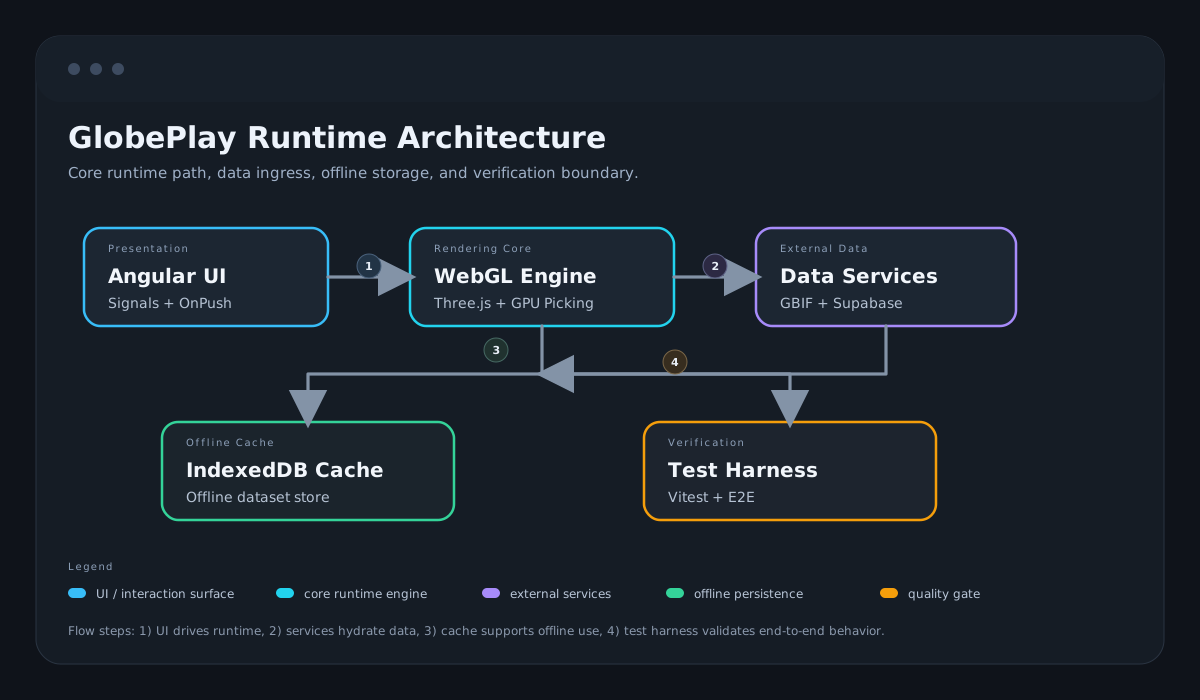
I split responsibilities into clear layers: Angular for UI orchestration, services for scene lifecycle, and a dedicated GPU path for selection and rendering. Early decisions focused on keeping interaction constant-time under dataset growth, then reducing runtime overhead with render-on-demand and stricter memory lifecycle controls.

  • Rendering engine: Three.js scene orchestration, GPU-based picking, and render-path optimization.
  • State architecture: Angular Signals for synchronous state and controlled RxJS use for async boundaries.
  • Performance engineering: bundle reduction, batched geometry paths, and render-on-demand behavior.
  • Data reliability: IndexedDB-first caching with debounced cloud sync and rate-limit-aware fetch handling.
  • Quality engineering: large automated test surface plus CI checks for regressions before deployment.

Key Engineering Decisions

GPU-Based Picking over CPU Raycasting

Rationale: My first approach was CPU raycasting, which worked fine with a few dozen meshes. But once I loaded all 241 countries, clicking became unreliable. Users could click through gaps between meshes and select countries on the opposite hemisphere. GPU picking reads a single pixel from an offscreen render target, so selection time stays constant no matter how many meshes are on screen.

Outcome: Selection latency dropped from tens of milliseconds to sub-millisecond. The hemisphere "see-through" bug disappeared entirely.

Three.js over Raw WebGL

Rationale: I considered writing raw WebGL for maximum control, but the boilerplate for scene management, camera controls, and geometry handling would have consumed weeks. Three.js gave me that foundation while still letting me drop into direct shader and render path optimization where it mattered.

Outcome: Faster development without giving up the ability to optimize performance-critical rendering paths.

Buffer Geometry Optimization for Memory Efficiency

Rationale: During extended sessions, I noticed the tab's memory usage kept climbing. Chrome DevTools showed geometry objects piling up because Three.js does not automatically dispose of GPU buffers. I added explicit geometry disposal, texture pooling, and buffer lifecycle tracking.

Outcome: ~30% reduction in memory overhead. No more creeping memory leaks during long sessions.

IndexedDB for Offline-First Data Access

Rationale: The target users often have spotty internet. Caching geospatial datasets in IndexedDB means the globe loads and stays interactive even without connectivity. The tricky part was designing the schema and cache invalidation to avoid data bloat from stale reads.

Outcome: Full offline functionality. Users can explore the globe on a plane or in a classroom with no Wi-Fi.

Tradeoffs

  • Accepted additional render pipeline complexity in exchange for stable selection latency at scale.
  • Prioritized smooth classroom interaction over adding advanced visual effects that increased frame-time variance.

Team Decision Points

  • Aligned on “classroom reliability first” as the product priority over purely visual fidelity.
  • Documented constraints and tradeoffs as decision records to keep future iterations consistent.

Team Scale Impact

  • Defined a shared performance budget (FPS, memory, interaction latency) so product discussions could use measurable acceptance criteria.
  • Translated rendering constraints into release-ready QA checks, improving alignment between engineering and validation workflows.

Results & Metrics

Frame Rate

Before: Inconsistent under load

After: ~60 FPS

Impact: Stable even under high geospatial dataset load

Selection Latency

Before: Tens of milliseconds (CPU raycasting)

After: Sub-millisecond

Impact: GPU-based picking eliminated interaction bugs

Memory Overhead

Before: Growing over time (buffer leaks)

After: ~30% reduction

Impact: Explicit disposal and texture pooling

Lighthouse Performance

After: 90+

Impact: Optimized render paths and code splitting

Test Coverage

After: 604 total tests, 86.4% coverage

Impact: Unit, integration, and E2E coverage with blocking release gates on the highest-risk user flows

Decision Evidence Matrix

Decision: Render-on-demand loop control

Risk: Continuous rendering during idle sessions increased GPU usage, battery drain, and fan noise.

Change: Moved to interaction/animation-triggered rendering rather than permanent redraw.

Result: 60fps during interaction and 0fps while idle; improved runtime efficiency on long sessions.

Source: Source
Decision: Critical-path CI quality gates

Risk: High-risk rendering and interaction regressions could reach production releases.

Change: Applied blocking CI gates to critical paths while maintaining broad total test coverage.

Result: 604 total tests with 86.4% coverage; release gating focused on highest-risk flows.

Source: Source

Decision: GPU picking for country selection

Risk: CPU selection paths degraded responsiveness as mesh and interaction complexity grew.

Change: Implemented GPU-based picking path for stable interaction latency at scale.

Result: Sub-millisecond selection behavior in production usage claims.

Source: Source

Risk Management & Rollback Strategy

  • Set hard performance budgets early and validated against realistic dataset size, not toy samples.
  • Added explicit geometry and texture disposal checks to prevent long-session memory regressions.
  • Used staged rollouts of rendering optimizations behind isolated modules to simplify rollback.

Incident Handling

Incident: Continuous rendering caused persistent GPU load, fan noise, and battery drain during idle periods.

Response: Instrumented the render loop, isolated non-essential continuous redraws, and switched to explicit request-driven rendering with animation-aware fallbacks.

Rollback: Prepared a fallback mode preserving essential globe interactions while temporarily disabling heavy visual layers.

Prevention: Added render-state guardrails and verification checks to ensure idle sessions return to near-zero rendering activity.

Operational Readiness

  • 604 automated tests total, including a blocking CI subset for critical interaction, rendering, and data-integrity paths to prevent release regressions.
  • Offline/cache behavior validated for low-connectivity classroom scenarios.
  • CI quality gates enforced build, lint, and regression checks before release promotion.

Architecture Diagram

GlobePlay architecture diagram showing Angular UI, rendering engine, IndexedDB cache, and remote dataset source.
System-level view of runtime layers and data flow.

Lessons Learned

  • I tried CPU raycasting first and it failed at scale. That taught me to prototype performance-critical paths with realistic data volumes before committing to an approach.
  • GPU memory leaks are silent until the tab crashes. I learned to treat explicit disposal as mandatory, not optional, for any WebGL project.
  • Bridging low-level rendering with Angular's change detection required thinking about rendering, data, and interaction as completely separate concerns.
  • Offline-first sounds simple but cache invalidation and schema design for IndexedDB took more iteration than the rendering work itself.
  • Writing 604 tests for a 3D project seemed excessive at first, but they caught two regressions in spatial indexing that I would have shipped otherwise.

What I'd Do Differently

  • Prototype GPU picking and memory lifecycle earlier to reduce rework.
  • Introduce automated long-session memory profiling earlier in development.

Stack

Angular Three.js WebGL TypeScript IndexedDB Supabase