Back to Work

Richtext2Markdown

I built Richtext2Markdown in Angular to make rich text conversion feel simple and dependable. Accessibility was part of the build from the start, the output stays predictable, and the import and export flows hold up across browsers.

Product Outcome: It made writing and converting content less frustrating, especially for people using the keyboard or assistive technology.

The Problem

This project focused on proving that accessibility and performance can both be first-class in rich-text tooling. Instead of retrofitting a11y after feature work, keyboard parity and semantic output were treated as release requirements from the beginning.

Rich text editors are notoriously hard to make accessible. Most popular libraries (CKEditor, TinyMCE) embed their own DOM structures and event handlers, making it difficult to control focus management, ARIA roles, or keyboard behavior. On top of that, I had strict startup-performance constraints that ruled out loading everything upfront.

Scope & Ownership

Scope: Delivered an end-to-end editing surface: editor lifecycle, conversion/import/export pipeline, alert and theme systems, and cross-browser validation.

Ownership: Owned architecture, accessibility standards, implementation, and automated verification as a solo engineer.

Why Angular For This Problem

Angular was selected for deterministic, testable UI behavior around editor state. Signals simplified synchronous interactions, while side-effectful flows stayed in focused services for import, alerts, and error handling.

Alternatives Considered

  • CKEditor and TinyMCE: rejected because internal abstractions limited accessibility control.
  • React editor stack: viable, but Angular’s template ergonomics and testing workflow aligned better with strict accessibility gates.

Roadmap Outcomes

  • Setting accessibility acceptance criteria as release gates prevented expensive retrofits and rework.
  • Keeping scope tight around conversion reliability and keyboard parity maintained delivery speed without sacrificing UX quality.

Constraints & Requirements

  • Accessibility compliance as a release requirement, not just a post-build check
  • Semantic fidelity when converting rich HTML to Markdown and back
  • Strict startup and interaction performance budgets under real-world conditions
  • Lean bundle constraints with deferred loading for non-critical features
  • URL fetching that fails gracefully without hanging the UI

Architecture & Technical Approach

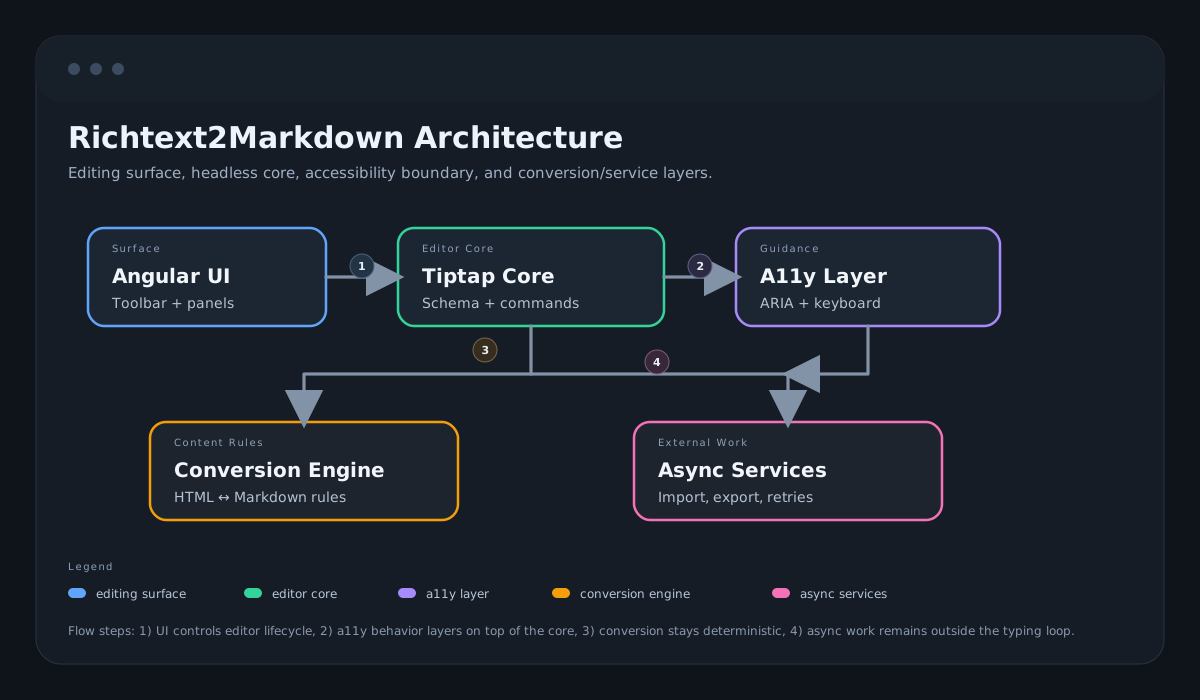
The architecture centered on a service-driven core (`EditorService`) so editor lifecycle, conversion logic, and import/export rules remained testable and predictable. A headless editor stack gave full control over keyboard flow and semantics, while lazy-loaded concerns kept initial payload and interaction latency inside budget.

  • Editor architecture: Tiptap lifecycle, content synchronization, and deterministic conversion behavior.
  • State and services: signal-driven UI state with service boundaries for theme, alerts, analytics, and error handling.
  • Performance: lazy-loading and bundle control to protect startup latency.
  • Accessibility: keyboard-first interactions, ARIA semantics, and automated a11y validation.
  • Testing: comprehensive automated suite with Playwright coverage across desktop and mobile browser engines.

Key Engineering Decisions

Tiptap over CKEditor and TinyMCE

Rationale: I tried CKEditor first. It rendered beautifully but fighting its internal focus management to make custom keyboard shortcuts work was painful. TinyMCE had similar issues. Tiptap's headless architecture meant more setup work upfront, but I could control every ARIA attribute and keyboard interaction directly.

Outcome: Accessibility-compliant keyboard navigation validated by automated audits and cross-browser testing.

Angular Signals over RxJS for UI State

Rationale: Editor state like cursor position, active formatting, and panel visibility changes synchronously and frequently. Signals handled this cleanly without the subscription management overhead of RxJS. I kept RxJS for genuinely async work like network requests.

Outcome: Cleaner components with less boilerplate. A clear boundary between sync UI updates and async data flows.

Exponential Backoff for URL Import Resilience

Rationale: The URL import feature fetches content from third-party servers. During testing, simple retries on failure would sometimes hammer a slow server with requests. Backoff with jitter spaces out retries and avoids thundering herd effects.

Outcome: URL imports recover from transient failures without hanging the editor or overwhelming external servers.

Lazy-Loaded Syntax Highlighting

Rationale: Syntax highlighting adds significant weight but is not needed on first render. Most users start typing before they paste code. Deferring the extension load kept TTI within budget.

Outcome: Protected startup performance and kept the app within release bundle budgets.

Tradeoffs

  • Chose a headless editor with higher implementation complexity to gain full accessibility control.
  • Deferred non-essential editor enhancements to preserve first-load performance budget.

Team Decision Points

  • Prioritized keyboard and screen-reader parity as a non-negotiable product requirement.
  • Accepted slower feature throughput in exchange for accessibility and reliability guarantees.

Team Scale Impact

  • Converted accessibility requirements into explicit acceptance criteria that can be reused across design, QA, and engineering teams.
  • Created deterministic conversion behavior and test fixtures that reduce review friction during iterative feature work.

Results & Metrics

Accessibility

Before: N/A (new build)

After: Accessibility-compliant baseline

Impact: Full compliance validated by axe-core, not just automated checks

Lighthouse Performance

After: Consistently strong

Impact: Lazy extensions and bundle discipline

First Contentful Paint

After: Within target budget

Impact: Deferred syntax highlighting and startup trimming

Time to Interactive

After: Within target budget

Impact: Code splitting and lazy imports

Bundle Size

After: Within release budget

Impact: Deferred non-critical dependencies

Test Coverage

After: Comprehensive automated suite

Impact: Unit tests, cross-browser E2E, and automated accessibility audits running in CI

Decision Evidence Matrix

Decision: Headless editor architecture

Risk: Prebuilt editor abstractions can hide focus/keyboard behavior and create accessibility regressions.

Change: Used Tiptap/ProseMirror with service-oriented orchestration for explicit interaction control.

Result: Accessibility-focused keyboard and conversion flows validated through automated and manual checks.

Source: Source
Decision: Cross-browser E2E matrix

Risk: Editor, import/export, and keyboard behavior can fail differently across browser engines.

Change: Validated critical flows across Chromium, Firefox, WebKit, Mobile Chrome, Mobile Safari, and Edge.

Result: Release confidence improved for cross-browser interaction parity.

Source: Source

Decision: Deferred non-critical startup work

Risk: Loading every editor feature upfront risks slower startup and lower responsiveness.

Change: Deferred non-critical modules and enforced startup performance budgets through iteration.

Result: Startup behavior stayed within release targets while retaining feature depth.

Source: Source

Risk Management & Rollback Strategy

  • Defined accessibility acceptance criteria up front to avoid late WCAG regressions.
  • Kept conversion logic deterministic with test fixtures for edge-case content.
  • Implemented retry backoff for network imports to prevent degraded UX under transient failures.

Incident Handling

Incident: A keyboard-navigation regression broke focus flow after a formatting toolbar refactor shortly before release.

Response: Stopped rollout, reproduced across browsers, and traced the issue to missing focus handoff in custom command handlers.

Rollback: Reverted the affected toolbar interaction patch and released with stable keyboard behavior while a corrected implementation was validated.

Prevention: Added focused accessibility regression tests and a pre-release checklist for keyboard and screen-reader interaction paths.

Operational Readiness

  • Automated tests including accessibility checks and cross-browser E2E.
  • Performance budgets tracked for FCP/TTI and enforced during iteration.
  • Resilient import flows with retry/backoff and clear user feedback on failure.

Architecture Diagram

Richtext editor architecture diagram showing UI layer, editor core, conversion pipeline, and async services.
System-level view of runtime layers and data flow.

Lessons Learned

  • Automated accessibility tools like axe-core catch about 30% of real issues. I had to manually test with VoiceOver and keyboard-only navigation to find the rest, which changed how I think about accessibility testing.
  • I learned to treat performance budgets the same way I treat test coverage: set the target before writing code, not after. Retrofitting performance into a bloated bundle is much harder.
  • Trying CKEditor first and hitting its accessibility limitations taught me to evaluate libraries by building a small accessibility proof-of-concept before committing.
  • The automated a11y audits in CI caught two regressions during development where a refactor broke focus order. Without those tests, I would have shipped broken keyboard navigation.
  • Headless tools trade more setup time for long-term control. For accessibility-critical projects, that tradeoff is always worth it.

What I'd Do Differently

  • Add screen-reader testing sessions earlier in sprint cadence, not only before release.
  • Create fixture-based conversion golden tests sooner for edge-case content.

Stack

Angular 19 TypeScript Tiptap Turndown Tailwind CSS Vitest Playwright

Explore Other Work